

Key Takeaways
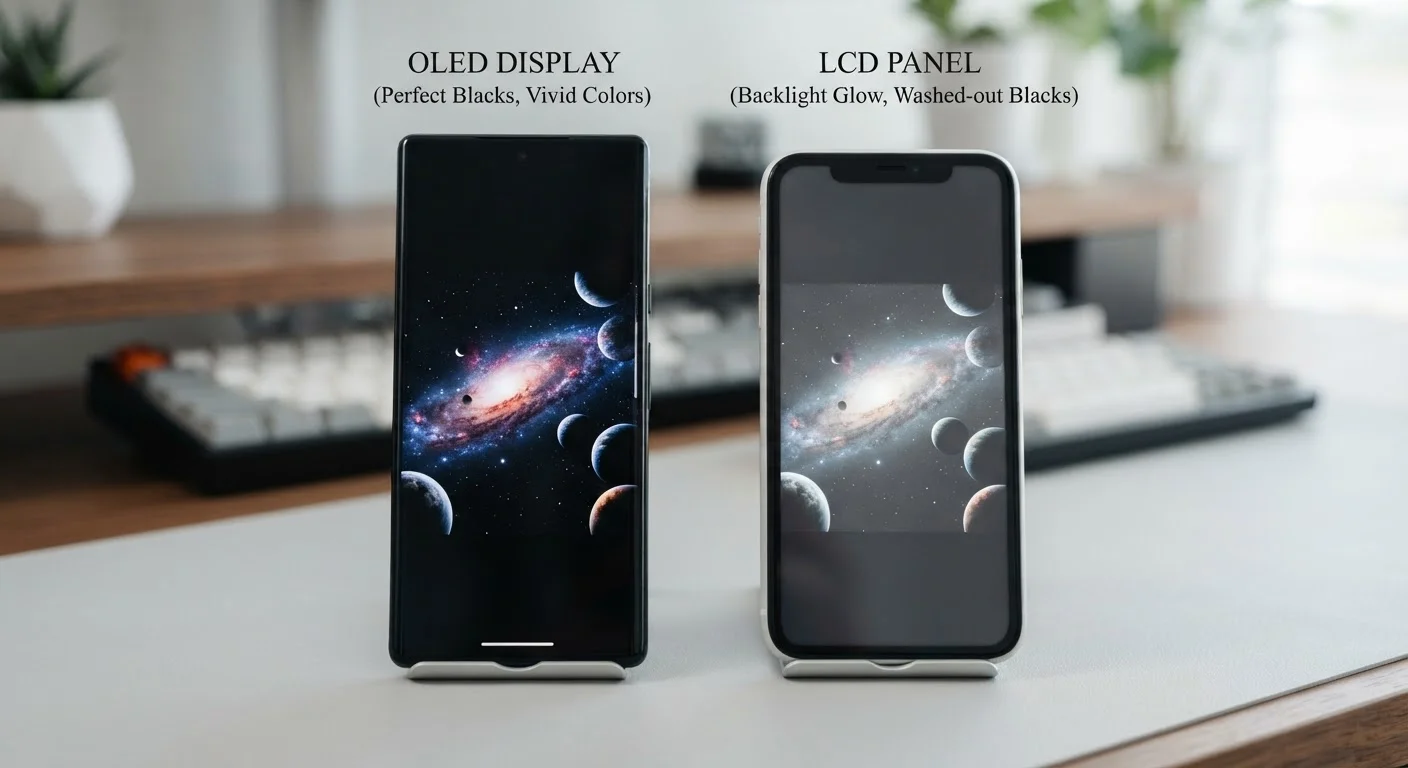
- OLED screens light each pixel individually, producing true blacks and higher contrast ratios.
- LCD panels use a backlight behind the entire screen, which limits how dark black areas can appear.
- OLED displays can consume less power when showing dark content; LCD uses steady backlight power regardless.
- LCD panels typically perform better in very bright outdoor conditions due to consistent high brightness.
- OLED screens carry a small risk of permanent burn-in from static images displayed over long periods.
- Your usage habits — not the technology alone — should guide which display type suits you better.
Option A
OLED
The high-contrast, pixel-level light control technology.
Best for: Users who prioritize vivid colors, deep blacks, and power efficiency with dark-themed apps.
Option B
LCD
The proven, bright, and cost-effective display standard.
Best for: Users who work frequently in direct sunlight or prefer a more budget-accessible display option.
If you frequently watch video or view photos in dim environments
OLED
OLED's pixel-level dimming produces true blacks and richer contrast, making media look noticeably more cinematic in low light.
If you spend most of your time outdoors or in bright sunlight
LCD
Many LCD panels sustain high peak brightness consistently, making screen content easier to read outside without reflective washout.
If battery longevity is your top priority
OLED
Using a dark system theme on an OLED display can reduce screen power draw meaningfully, since unlit pixels consume almost no energy.
If you display static content for long periods, such as navigation or dashboards
LCD
LCD panels are not susceptible to burn-in, making them more suitable when the same image elements remain on screen for extended sessions.
If overall device cost is a key consideration
LCD
LCD manufacturing is more mature and less expensive, which is often reflected in lower device price points at equivalent screen sizes.
How Each Technology Actually Works
Understanding the difference between OLED and LCD starts with one core concept: where the light comes from.
LCD — short for Liquid Crystal Display — works by shining a single backlight across the entire panel. Tiny liquid crystals shift to block or allow that light through in precise patterns, while a color filter layer produces the hues you see. Because the backlight is always on, even areas of the screen that should appear black are still illuminated to some degree, which is why LCDs produce dark gray rather than true black.
OLED — Organic Light-Emitting Diode — takes a different approach entirely. Each individual pixel generates its own light. When a pixel needs to display black, it simply switches off. This is why OLED screens can achieve genuine, absolute black, and why the contrast between bright and dark areas looks so dramatic.
For a broader look at how these terms fit into the wider world of display specifications, the display specs explainer covers resolution and refresh rate alongside panel types in plain language.
| Criterion | OLED | LCD |
|---|---|---|
| Light source | Each pixel self-illuminates | Single backlight behind panel |
| Black level | True black (pixel off) | Dark gray (backlight bleeds) |
| Contrast ratio | Extremely high (1,000,000:1+) | Moderate (around 1,000:1) |
| Outdoor brightness | Variable; high-end models competitive | Consistently strong across panel |
| Power use with dark content | Lower (dark pixels draw less power) | Steady regardless of content |
| Burn-in risk | Present; mitigated by software | None |
| Typical cost impact | Higher manufacturing cost | Lower manufacturing cost |
| Color accuracy | Wide gamut, can be vivid | More neutral; varies by panel grade |
What This Means for Everyday Use
The engineering differences translate into real, noticeable effects during daily use across four key areas.
Color and Contrast
OLED screens tend to deliver punchier, more saturated color and far higher contrast ratios — sometimes exceeding 1,000,000:1 compared to roughly 1,000:1 on a typical LCD. Whether that looks better is partly a matter of preference; some users find OLED colors slightly over-saturated compared to real life, while others love the vibrancy.
Brightness and Outdoor Visibility
LCD panels have traditionally held an advantage in very bright outdoor conditions, maintaining consistent peak brightness across the whole screen. High-end OLED panels have closed this gap considerably, but sustained full-screen brightness can be a limitation in some OLED designs due to heat management.
Battery and Power Draw
OLED's pixel-off black means that using a dark or black system theme can meaningfully reduce screen power consumption. On an LCD, the backlight draws roughly the same power whether the screen is showing a white webpage or a black background. This relationship is explored further in the battery life reality check, which explains what specs don't reveal about real-world endurance.
Burn-In Risk
OLED carries a well-documented but often overstated risk of burn-in — the gradual, permanent fading or ghosting of static interface elements (like a navigation bar or status icons) after prolonged display. Modern devices include software mitigations that shift pixels slightly over time to minimize this. LCD panels have no burn-in vulnerability.
1,000,000:1
Typical OLED contrast ratio
OLED panels commonly achieve contrast ratios exceeding one million to one, compared to around one thousand to one on standard LCD panels.
~40%
Screen power reduction with dark mode on OLED
Research published by Google indicated that switching to a fully dark interface on OLED screens can reduce display power draw by roughly 40% at high brightness settings.
Choosing the Display That Fits Your Habits
Neither technology is universally superior — the right choice depends on how and where you use your device.
If you consume a lot of video content, use dark mode regularly, or care deeply about color depth in photos, OLED's characteristics align well with those priorities. If you work outdoors frequently, use navigation apps on a mounted device for long stretches, or are weighing cost carefully, LCD's strengths become more relevant.
It's also worth remembering that display quality is just one dimension of a mobile device. The smartphone vs. tablet guide walks through how screen size, portability, and use case intersect when choosing between device categories — a separate but related decision.
For those wanting a complete reference on mobile terminology, the mobile glossary defines OLED, refresh rate, and dozens of other terms in plain language. And if you're curious how display panel comparisons extend beyond phones, TV resolution explained applies similar concepts to larger screens.
AMOLED and IPS LCD: What Those Labels Mean
You'll often see variants like AMOLED (Active Matrix OLED) or IPS LCD (In-Plane Switching LCD) in device specs. AMOLED is simply a more common form of OLED used in mobile devices, offering the same core characteristics described here. IPS is a subtype of LCD that improves viewing angles and color accuracy compared to older LCD designs. The fundamental OLED vs. LCD distinctions still apply regardless of which variant a device uses.