

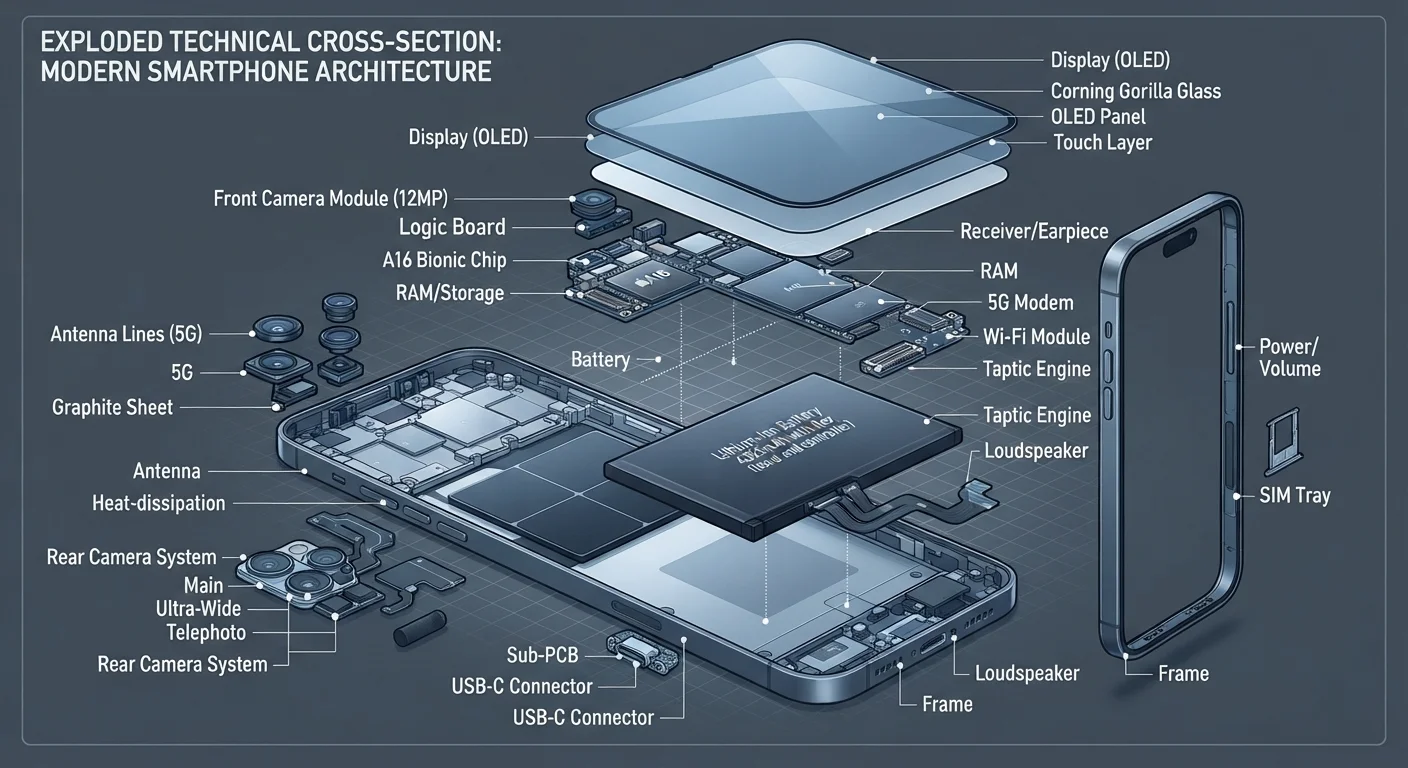
Key Takeaways
- The SoC (System on a Chip) is the brain of your phone, handling processing, graphics, and often cellular connectivity.
- RAM determines how many apps your phone can keep active at once without slowing down.
- Battery capacity is measured in milliamp-hours (mAh) — higher numbers generally mean longer use between charges.
- The camera system relies on sensors and image signal processors, not just megapixel count.
- Display technology directly affects color quality, brightness, and how much battery your screen consumes.
Smartphone Hardware
Smartphone hardware refers to the physical components inside your phone — the chips, sensors, battery, and display — that work together to run every task you perform. Each component has a specific job, and how well those jobs are done determines your phone's overall speed, camera quality, battery life, and connectivity. Understanding what each part does helps you make sense of the specs listed on a phone's packaging.
Most modern smartphones integrate several functions onto a single chip package called a System on a Chip (SoC), which combines the processor, graphics unit, modem, and other elements into one compact module.
The SoC: Your Phone's Central Command
The System on a Chip (SoC) is the most consequential piece of hardware in any smartphone. Think of it as the brain — it coordinates everything from running your apps to processing camera images to managing wireless connections. Unlike a traditional desktop computer where the processor, graphics card, and modem are separate components, a smartphone SoC consolidates all of these into a single compact package.
Inside a typical SoC, you'll find a CPU (Central Processing Unit) for general computing tasks, a GPU (Graphics Processing Unit) for rendering visuals, an ISP (Image Signal Processor) for camera processing, and increasingly, dedicated AI accelerators that handle machine-learning tasks like voice recognition and photo enhancement. The efficiency of the SoC directly determines how fast your phone feels and how long the battery lasts under load.
For a broader glossary of these terms, see the Mobile Glossary for plain-language definitions of SoC, GPU, and more.
3+ billion
Smartphones in active use globally
Estimates from industry analysts suggest more than three billion smartphones are in active use worldwide, making mobile hardware one of the most widespread technologies in history.
~40%
Battery consumed by the display on average
Display hardware typically accounts for roughly 40% of a smartphone's daily power consumption, according to mobile hardware research, making screen technology a key factor in real-world battery life.
5,000+ mAh
Common flagship battery capacity
Many current flagship-tier smartphones ship with battery capacities of 5,000 mAh or more, compared to around 1,400 mAh in early smartphones from the mid-2000s.
RAM, Storage, and the Battery
RAM (Random Access Memory) is your phone's short-term workspace. When you switch between apps, RAM keeps them ready so they reload instantly instead of restarting from scratch. Phones with more RAM handle multitasking more smoothly — a meaningful difference when you're toggling between a navigation app, music streaming, and messaging simultaneously.
Internal storage — often labeled as 128GB or 256GB — is where your photos, videos, downloaded apps, and files live permanently. Unlike RAM, storage doesn't affect processing speed directly, but running low on it can cause performance issues. You can read more about why that happens in our article on why phones slow down over time.
The battery is measured in milliamp-hours (mAh) — a higher number means more stored energy, which typically translates to longer use between charges. However, battery life also depends on how efficiently the SoC and display consume power. A larger battery in a phone with a power-hungry screen may still drain quickly.
Check Both RAM and Storage Before Deciding
When evaluating a phone, consider RAM and storage as separate specifications with different effects on your experience. RAM shapes how smoothly the phone multitasks day-to-day, while storage determines how much you can save long-term. A phone with ample storage but limited RAM may feel sluggish during heavy use, even if it never runs out of space.
The Display, Camera, and Connectivity Hardware
The display is what you interact with most, and its underlying technology shapes both the viewing experience and power consumption. OLED panels produce deeper blacks and more vivid colors by lighting pixels individually, while LCD screens use a backlight behind the entire panel. Our OLED vs. LCD breakdown explains the practical differences in everyday use.
The camera system is more than just the lens. A camera module includes the image sensor (which captures light), the aperture (which controls how much light enters), and the ISP inside the SoC that processes raw image data into a finished photo. Multiple rear cameras typically serve different purposes — wide-angle, telephoto, and ultrawide — rather than simply adding redundancy. For a deeper look, see our guide to what actually affects phone camera quality.
The modem manages your phone's wireless communication. It handles cellular data (4G LTE or 5G), and works alongside separate radios for Wi-Fi and Bluetooth. On many modern phones the modem is integrated directly into the SoC. Modem quality affects your signal reliability and data speeds — factors explored further in our piece on 5G, 4G LTE, and Wi-Fi connectivity.
Sensors, Security Hardware, and Why It All Connects
Beyond the headline components, smartphones contain a collection of sensors that enable everyday features. The accelerometer detects movement and orientation. The gyroscope enables precise rotation tracking used in gaming and navigation. A barometer measures altitude for weather and fitness apps. The proximity sensor dims the screen when you hold the phone to your ear during a call.
Security features also rely on dedicated hardware. Fingerprint sensors use either optical (light-based) or capacitive (electrical) methods to scan your print. Many phones include a secure enclave — a separate, isolated processor that stores biometric data and encryption keys away from the main operating system, making it harder for malicious software to access sensitive information. Developing good habits around these features matters; our guide on keeping your smartphone secure covers the practical steps.
All of these components are coordinated by the phone's operating system, which allocates processing power, manages battery draw, and routes data between hardware layers. Understanding what each part does gives you a more grounded way to evaluate any phone — beyond marketing language and into the hardware reality.
For a comprehensive overview of smartphone ownership from specs to security, see The Full Picture on Smartphone and Tablet Ownership.
“The smartphone is perhaps the most complex consumer device ever mass-produced. Every component represents decades of engineering miniaturization, and understanding what each part does is the first step to being an informed user.”
— Industry Hardware Analyst, Mobile Technology Research Commentator